

Working with sessions
Claude Code saves your conversation locally as you work — every message, tool use, and result is written to a plaintext JSONL file under ~/.claude/projects/. Before making code changes, it also snapshots the affected files so you can revert.
Sessions are independent. Each new session starts with a fresh context window. Learnings persist across sessions only through auto memory and CLAUDE.md.
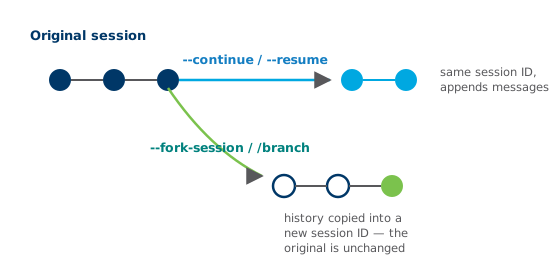
Resume vs. fork, redrawn in brand colors.
Resuming with claude --continue or claude --resume reopens a session under the same ID and appends new messages. Forking with --fork-session or /branch copies the history into a new session ID, leaving the original unchanged.
Sessions are tied to your current directory. To run parallel sessions safely, use git worktrees — separate directories for individual branches so changes don't collide.
Check your understanding
Section titled “Check your understanding”Question 1What is the difference between resuming and forking a session?
Resume = same ID, appended messages. Fork = copied history, new ID, original untouched.
Question 2Where are session transcripts stored?
Plaintext JSONL under ~/.claude/projects/ — which also enables rewind, resume, and fork.
Question 3How do you run parallel Claude sessions on different branches safely?
Worktrees give each branch its own directory, so parallel sessions don't collide.